Skip to content
Have you ever wished you could listen to two songs at once one in each earbud? Maybe you and your friend want to share earbuds but prefer different music. Or maybe you just love experimenting with sound. Listening to different songs in each earbud is not only possible—it’s surprisingly easy with the right setup.
Scroll Down To See Download Button
Table of Contents
Understanding the Concept
Normally, when you play a song, the left and right earbuds play two slightly different parts of the same track (that’s called stereo sound). But when you separate the audio channels, each earbud can play a completely different song. Essentially, you’re turning one audio output into two independent ones.
This concept has become popular among music lovers, creators, and even couples who can’t agree on what to play!
Benefits of Listening to Different Songs in Each Earbud
1. Perfect for Multitaskers
Some people like listening to a podcast in one ear while playing lo-fi beats in the other. It’s a great way to stay informed and relaxed simultaneously.
2. Ideal for Shared Listening
Imagine you and your friend want to listen to different tracks during a commute but have only one device. Splitting the earbuds solves that problem instantly.
3. Useful for DJs and Music Creators
DJs often use this technique to test track blending or transitions without using expensive mixing gear.
4. Fun for Experiments
Ever tried mixing two random songs to see if they sound good together? This trick makes that fun and easy.
Free Anime Inspired Personalization Tool
Technical Requirements
Before jumping in, check if your setup supports dual-audio or split-sound playback.
- Devices: Android phones, iPhones, Windows PCs, Macs, and some smart TVs.
- Earbuds: Wired or Bluetooth earbuds both work, but Bluetooth might need extra setup.
- Software: Music player apps or split-audio tools that allow multi-source playback.
How to Listen to Different Songs in Each Earbud
Using a Smartphone
For Android:
- Open your device Settings → Accessibility.
- Turn on Mono Audio (off if already on).
- Use an app like Audio Router or SplitCloud.
- In SplitCloud, select two songs—assign one to the left ear and the other to the right.
For iPhone:
- Download SplitCloud Double Music Player from the App Store.
- Choose your two favorite tracks.
- Plug in earbuds and play—the left and right sides will play different songs!
Using a PC or Laptop
Windows:
- Open Sound Settings → App Volume and Device Preferences.
- Set different output devices for each app.
- Open two media players (like VLC and Groove).
- Assign each to left or right channels using audio settings.
macOS:
- Go to Audio MIDI Setup.
- Create an Aggregate Device.
- Assign apps to different channels.
Using Third-Party Apps
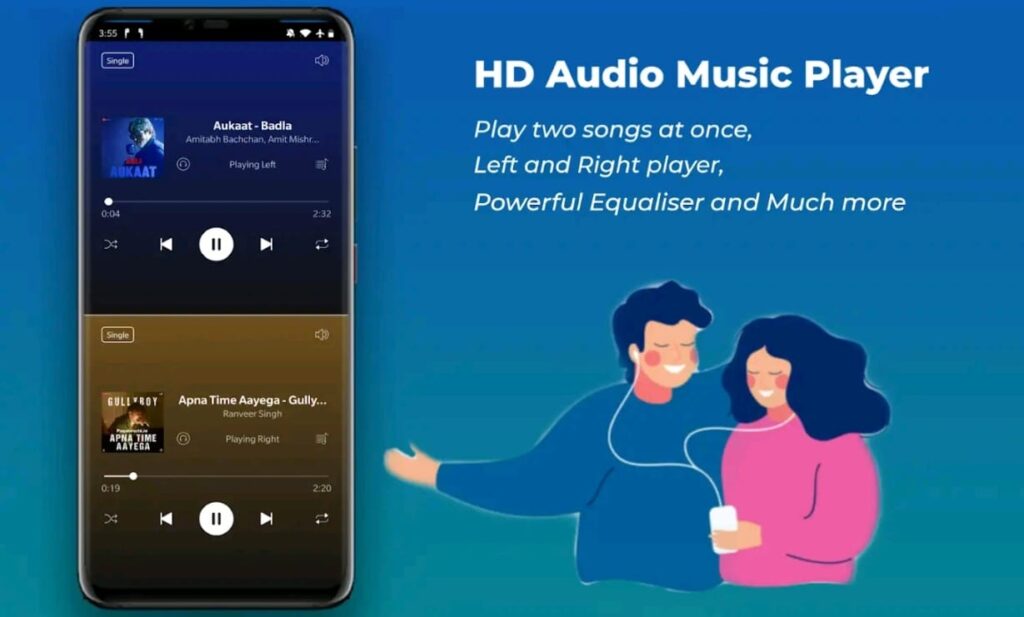
Best Apps for Android & iPhone:
- SplitCloud Double Music Player
- Dual Audio Player
- SoundAssistant (Samsung)
- Audio Router
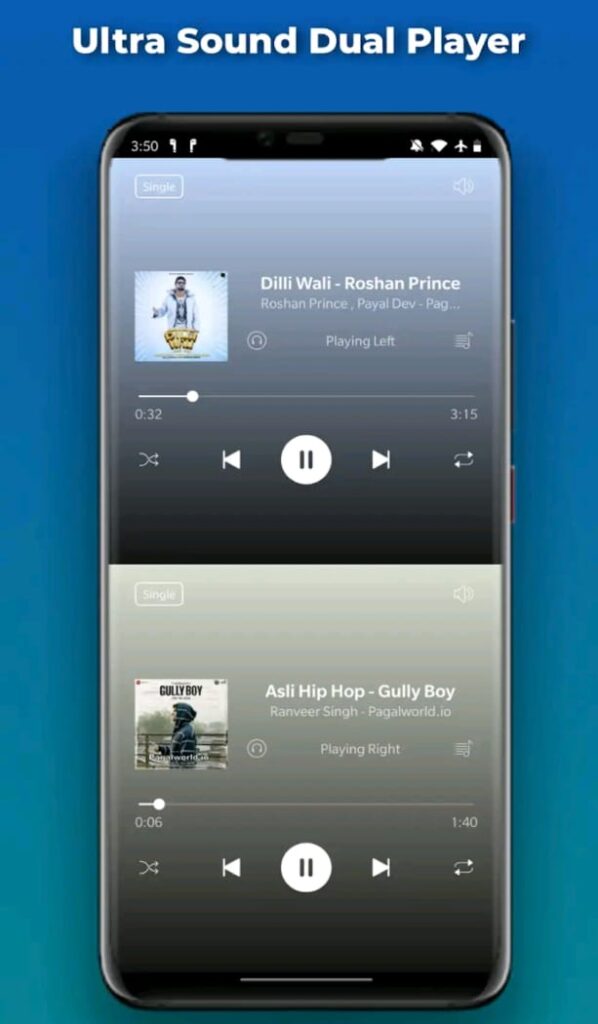
These apps let you choose two tracks, control their volume separately, and direct each to left/right channels.
Creative Ways to Use This Trick
Music Mashups
Play two songs with similar tempos and see if they sync. You might accidentally create your own remix!
Study and Relax
Play white noise or instrumental sounds in one ear, and a motivational podcast in the other.
Couple Listening
Can’t agree on one playlist? Each person gets their own side—problem solved.
Challenges and Limitations
- Audio Confusion: Your brain might get overwhelmed hearing two songs at once.
- Quality Loss: Some devices compress or distort split audio.
- Bluetooth Lag: Wireless earbuds might have slight syncing delays.
Tips for the Best Experience
- Use songs with contrasting genres (e.g., calm + energetic).
- Keep volume moderate to avoid confusion.
- Try binaural beats or ASMR tracks—they’re designed for left/right ear experiences.
Safety Precautions
Listening to two songs simultaneously can cause ear fatigue if done for long periods.
Take breaks every 30–40 minutes and avoid max volume to protect your hearing.
Common Mistakes to Avoid
- Forgetting to turn off mono mode (which combines both channels).
- Using outdated apps or incompatible earbuds.
- Ignoring balance controls—always test before full playback.
Alternative Audio Tricks
- Mix audiobooks and background music.
- Use dual Bluetooth connections to pair two headsets.
- Try sound-mixing tools for advanced setups.
Future of Personalized Listening
The future of audio personalization looks exciting.
AI and smart earbuds are evolving to let each listener hear a completely different sound profile—even from the same device. Soon, sharing music might feel like having two personal concerts in one space.
Please wait 10 seconds…
📥 Download NowConclusion
Listening to different songs in each earbud is more than just a tech gimmick—it’s a creative and fun way to experience sound. Whether you’re experimenting with music, sharing earbuds with a friend, or multitasking, this trick opens new possibilities for how we enjoy audio.
So grab your earbuds, pick your tracks, and start exploring a brand-new way to listen!
Can I use this method on any phone?
Yes, most modern smartphones support this using apps like SplitCloud or dual audio settings.
Will it damage my earbuds?
No, this setup won’t harm your earbuds—it just changes the audio source for each side.
Is it safe to listen to two songs at once?
It’s safe, but limit long sessions to avoid ear strain or confusion.
What’s the best app for this trick?
SplitCloud Double Music Player is the most popular and user-friendly choice.
Can I do this with Bluetooth headphones?
Yes, but some older Bluetooth earbuds may not perfectly sync both sides.